

TruStage
Amazon
Brivity
Project Manager & UX Designer | Brivity | 2019
Real Estate Agent Commission Calculator
Flexible enough for all
1 Context
In the start-up years, Brivity was realtor-specific client relationship management software. Over time, transaction management features were added, so that a contact can be linked directly to the property they are buying or selling. Ben Kinney Teams, which is owned and operated by the Brivity CEO, uses the software in 21 locations in 7 states. The product vision was to become an all-in-one platform for agents and teams to go from meeting a client to closing a deal.
Transaction managers are the keys to running successful large real estate teams. A missing piece in their end-to-end journey was managing the finances, like gross income, brokerage fees, and net commission payments for agents. The existing system scattered information between multiple spreadsheets and contracts. I did everything from hearing the idea from Ben Kinney himself, getting the priority order from him, doing competitor research, interviewing transaction managers, designing the UI, writing the developer stories.
2 Evaluation
I first focused on unpacking the elements that make up a real estate transaction. There was only one direct competitor, and it was a downloadable spreadsheet template. I studied it and real examples from transaction managers within Ben Kinney Teams, and interviewed agents with different structures. For example, one was a single-person operation with the agent completing the job of a transaction manager. And another was from a brokerage that charged a commission split and royalty fee. From this research, I broke down the logic into the simplest terms.
The target users for this feature, from leadership’s point of view, were mainly Ben Kinney team members. Through my research, I knew the system had to facilitate more than just their way of calculating agent commission to be relevant to all Brivity users.
3 Treatment
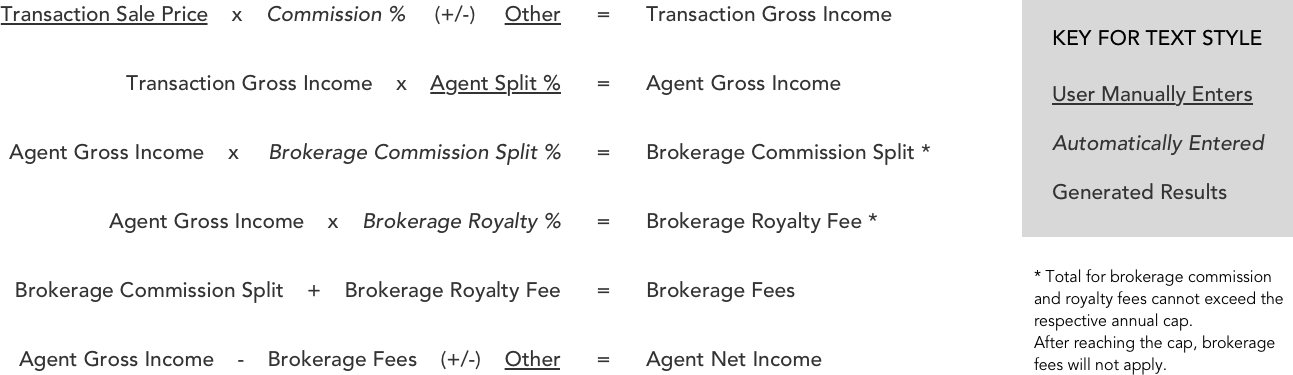
The result is a cascading math equation that provides the final numbers needed to report to the team and brokerage. There are three types of numbers: a generated number, an automatic entry number, and a custom entry number. For the majority of sales, the only custom entry number is the sale price. Everything else can be automated. This is the real time saver, and differentiating feature from the spreadsheet.
I advocated for and ensured that requirements allowed for flexibility with functions like flat or percentage-based fee, and a drag-and-drop interaction to order the formula correctly, all to make the math work out exactly as required by the team and brokerage.
4 Results
I translated the solution into clear developer stories and oversaw an offshore engineering team build to the specifications. The agent commission calculator feature shipped and the transaction managers around my office became the feature power users. They would complete the financial report by marking a home as closed, something that was already part of their workflow. Since its release there have been some UI updates, but the logic I originally discovered and specified is still the underlying structure.
Work together
grace.anderson@ganderful.com
TruStage
Amazon
Brivity
Project Manager & UX Designer | Brivity | 2019
Real Estate Agent Commission Calculator
Flexible enough for all
1 Context
In the start-up years, Brivity was realtor-specific client relationship management software. Over time, transaction management features were added, so that a contact can be linked directly to the property they are buying or selling. Ben Kinney Teams, which is owned and operated by the Brivity CEO, uses the software in 21 locations in 7 states. The product vision was to become an all-in-one platform for agents and teams to go from meeting a client to closing a deal.
Transaction managers are the keys to running successful large real estate teams. A missing piece in their end-to-end journey was managing the finances, like gross income, brokerage fees, and net commission payments for agents. The existing system scattered information between multiple spreadsheets and contracts. I did everything from hearing the idea from Ben Kinney himself, getting the priority order from him, doing competitor research, interviewing transaction managers, designing the UI, writing the developer stories.
2 Evaluation
I first focused on unpacking the elements that make up a real estate transaction. There was only one direct competitor, and it was a downloadable spreadsheet template. I studied it and real examples from transaction managers within Ben Kinney Teams, and interviewed agents with different structures. For example, one was a single-person operation with the agent completing the job of a transaction manager. And another was from a brokerage that charged a commission split and royalty fee. From this research, I broke down the logic into the simplest terms.
The target users for this feature, from leadership’s point of view, were mainly Ben Kinney team members. Through my research, I knew the system had to facilitate more than just their way of calculating agent commission to be relevant to all Brivity users.
3 Treatment
The result is a cascading math equation that provides the final numbers needed to report to the team and brokerage. There are three types of numbers: a generated number, an automatic entry number, and a custom entry number. For the majority of sales, the only custom entry number is the sale price. Everything else can be automated. This is the real time saver, and differentiating feature from the spreadsheet.
I advocated for and ensured that requirements allowed for flexibility with functions like flat or percentage-based fee, and a drag-and-drop interaction to order the formula correctly, all to make the math work out exactly as required by the team and brokerage.
4 Results
I translated the solution into clear developer stories and oversaw an offshore engineering team build to the specifications. The agent commission calculator feature shipped and the transaction managers around my office became the feature power users. They would complete the financial report by marking a home as closed, something that was already part of their workflow. Since its release there have been some UI updates, but the logic I originally discovered and specified is still the underlying structure.
Work together
grace.anderson@ganderful.com
TruStage
Amazon
Brivity
Project Manager & UX Designer | Brivity | 2019
Real Estate Agent Commission Calculator
Flexible enough for all
1 Context
In the start-up years, Brivity was realtor-specific client relationship management software. Over time, transaction management features were added, so that a contact can be linked directly to the property they are buying or selling. Ben Kinney Teams, which is owned and operated by the Brivity CEO, uses the software in 21 locations in 7 states. The product vision was to become an all-in-one platform for agents and teams to go from meeting a client to closing a deal.
Transaction managers are the keys to running successful large real estate teams. A missing piece in their end-to-end journey was managing the finances, like gross income, brokerage fees, and net commission payments for agents. The existing system scattered information between multiple spreadsheets and contracts. I did everything from hearing the idea from Ben Kinney himself, getting the priority order from him, doing competitor research, interviewing transaction managers, designing the UI, and writing the developer stories.
2 Evaluation
I first focused on unpacking the elements that make up a real estate transaction. There was only one direct competitor, and it was a downloadable spreadsheet template. I studied it and real examples from transaction managers within Ben Kinney Teams, and interviewed agents with different structures. For example, one was a single-person operation with the agent completing the job of a transaction manager. And another was from a brokerage that charged a commission split and royalty fee. From this research, I broke down the logic into the simplest terms.
The target users for this feature, from leadership’s point of view, were mainly Ben Kinney team members. Through my research, I knew the system had to facilitate more than just their way of calculating agent commission to be relevant to all Brivity users.
3 Treatment
The result is a cascading math equation that provides the final numbers needed to report to the team and brokerage. There are three types of numbers: a generated number, an automatic entry number, and a custom entry number. For the majority of sales, the only custom entry number is the sale price. Everything else can be automated. This is the real time saver, and differentiating feature from the spreadsheet.
I advocated for and ensured that requirements allowed for flexibility with functions like flat or percentage-based fee, and a drag-and-drop interaction to order the formula correctly, all to make the math work out exactly as required by the team and brokerage.
4 Results
I translated the solution into clear developer stories and oversaw an offshore engineering team build to the specifications. The agent commission calculator feature shipped and the transaction managers around my office became the feature power users. They would complete the financial report by marking a home as closed, something that was already part of their workflow. Since its release there have been some UI updates, but the logic I originally discovered and specified is still the underlying structure.
Work together
grace.anderson@ganderful.com